 logo
logo



Organizations that manage several websites often reach a point where separate WordPress installations become difficult to maintain. Updates take longer, plugin licenses become harder to track, and performance varies from one site to another. WordPress Multisite hosting offers a structured way to manage many websites from one network while keeping administration, security, and scaling more efficient.
TLDR: WordPress Multisite hosting allows a business, agency, school, or franchise to run multiple websites from a single WordPress installation. For example, a regional company with 25 location websites could reduce routine update work by more than 60% by managing themes, plugins, and users centrally. It is most useful when sites share similar technical requirements but still need separate content, branding, or administrators.
What WordPress Multisite Hosting Means
WordPress Multisite is a built-in WordPress feature that enables one installation to power a network of sites. Each site can have its own dashboard, content, media library, users, and domain or subdomain. However, they all share the same core WordPress files, many plugins, themes, and server resources.
In practice, this means a university might operate websites for departments, research centers, and student groups from a single network. A marketing agency might host client microsites in one environment. A franchise company might create a separate site for each branch while maintaining brand standards across the network.
Multisite hosting refers to hosting infrastructure prepared specifically for this setup. It must support larger databases, higher traffic variability, advanced caching, strong security segmentation, domain mapping, and reliable backups for both the network and individual sites.
Why Scaling Multiple Websites Separately Becomes Difficult
Running several independent WordPress sites may seem simple at first. A small team might manage three or four installations without much trouble. As the number grows, however, routine tasks multiply quickly. Updating one plugin across 40 websites means logging in 40 times, checking compatibility 40 times, and troubleshooting 40 possible issues.
Separate installations can also create inconsistency. One site may run an outdated plugin, another may use a different theme version, and another may have weak security settings. Over time, this creates operational risk. The larger the portfolio becomes, the more important centralized control becomes.
WordPress Multisite helps reduce that complexity. Network administrators can install themes and plugins once, then activate them across selected sites. They can add new websites from a central dashboard, assign site administrators, and maintain consistent technical standards.
Key Benefits of WordPress Multisite Hosting
- Centralized updates: WordPress core, themes, and plugins can be updated once for the entire network, saving time and reducing version conflicts.
- Faster site deployment: New websites can be created quickly using shared templates, approved plugins, and predefined settings.
- Consistent branding: Organizations can maintain approved themes, layouts, and design elements while still allowing local content control.
- Streamlined user management: Users can be assigned to one or many sites, making it easier to manage access for editors, managers, and administrators.
- Lower maintenance overhead: One codebase is easier to monitor, secure, and optimize than dozens of separate installations.
For an agency managing 50 small business websites, these benefits can be significant. Instead of spending several hours each week on repetitive maintenance, the agency can focus more on content strategy, performance improvements, and client support.
Hosting Requirements for a Multisite Network
Not every hosting plan is ideal for WordPress Multisite. Since multiple websites share resources, the hosting environment must be able to handle traffic spikes and database activity across the entire network. A small shared hosting plan may work for testing, but it is rarely appropriate for serious scaling.
A strong Multisite hosting setup usually includes scalable server resources, object caching, content delivery network integration, staging environments, automated backups, malware scanning, and expert WordPress support. Database performance is especially important because all sites in the network depend on the same database structure.
Security also requires careful planning. While each website has its own content and users, the network is still connected. If a poorly maintained plugin creates a vulnerability, the entire network could be affected. This is why plugin selection, user permissions, and regular monitoring are essential.
When WordPress Multisite Is a Good Fit
WordPress Multisite works best when the websites are related in purpose, ownership, or technical structure. Examples include school districts, universities, hotel groups, nonprofit networks, franchise brands, publishing networks, and companies with regional offices.
It is also useful when many websites require similar functionality. If each site needs the same forms, SEO tools, analytics integration, security plugins, and design system, Multisite can simplify management. Network administrators can control the foundation while individual site owners manage their own pages and posts.
However, Multisite is not always the right choice. If every site needs a very different plugin stack, custom server configuration, or completely separate ownership, individual WordPress installations may be safer. Multisite creates efficiency through shared infrastructure, but that same shared structure can limit flexibility.
Important Challenges to Consider
Although WordPress Multisite can simplify operations, it requires thoughtful planning. One key challenge is plugin compatibility. Some plugins work perfectly on single WordPress installs but may behave differently in a network. Before adding any plugin to a Multisite environment, administrators should test it carefully.
Another challenge is backup and restoration. A full network backup is important, but organizations may also need the ability to restore one site without affecting the others. This requires hosting tools that understand Multisite architecture.
Performance planning is equally important. If one website in the network experiences a sudden traffic surge, it may affect other websites unless hosting resources are properly isolated or scalable. High-quality caching, load balancing, and traffic monitoring help protect the entire network.
Best Practices for Scaling Successfully
- Start with a clear site structure: The organization should decide whether sites will use subdomains, subdirectories, or mapped custom domains.
- Limit plugin access: Only trusted network administrators should install plugins, reducing the risk of conflicts and security issues.
- Use role-based permissions: Site administrators should receive only the access they need to manage content and users.
- Choose scalable hosting early: Moving a large Multisite network later can be complex, so the hosting foundation should support growth from the beginning.
- Monitor each site individually: Network-wide reports are useful, but site-level analytics help identify performance or traffic problems faster.

The Role of Analytics and Governance
As a network grows, governance becomes just as important as hosting. Organizations should define who can create new sites, approve plugins, edit themes, and access analytics. Without clear rules, a Multisite network can become disorganized even though it is technically centralized.
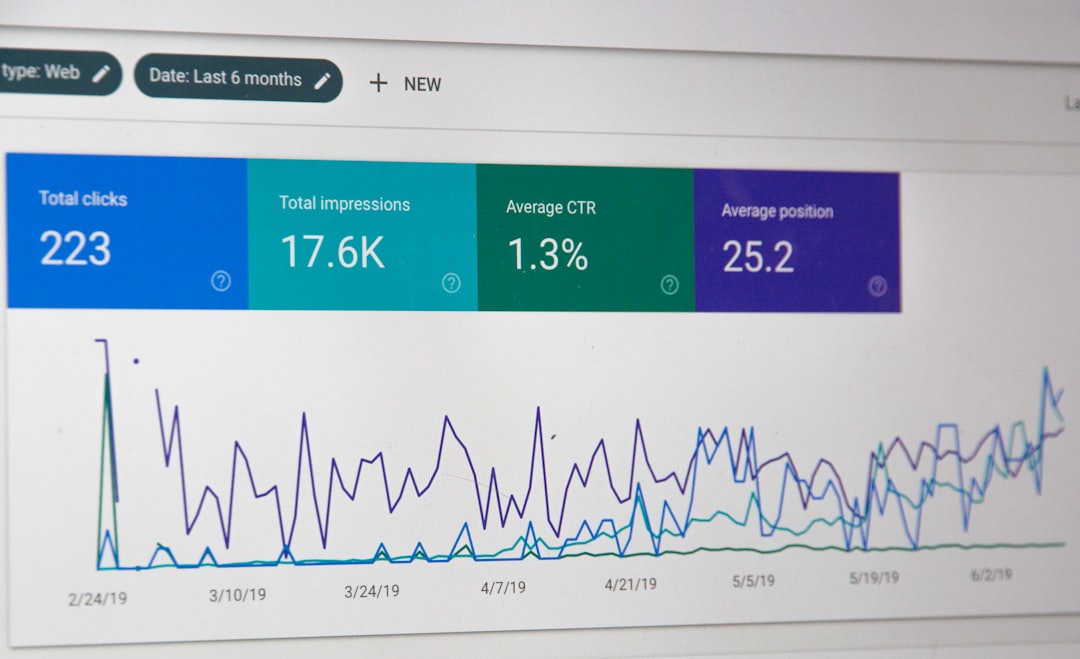
Analytics can guide better scaling decisions. For example, if 10% of sites generate 70% of total traffic, hosting resources may need to be optimized around those high-performing properties. Less active sites may require lighter caching rules, fewer active plugins, or archived content strategies.
With proper reporting, administrators can find slow pages, unused themes, outdated content, and user accounts that should be removed. This keeps the network lean and easier to manage over time.
Conclusion
WordPress Multisite hosting is a powerful solution for organizations that need to manage many related websites efficiently. It reduces repetitive maintenance, improves consistency, and makes launching new sites faster. However, it also requires strong hosting, disciplined governance, careful plugin management, and a clear understanding of shared infrastructure.
For teams planning long-term growth, Multisite can become a practical foundation for digital expansion. When implemented correctly, it allows multiple websites to operate independently in content and audience while remaining unified in technology, security, and administration.
FAQ
What is WordPress Multisite hosting?
WordPress Multisite hosting is hosting designed to support a network of multiple websites running from one WordPress installation. It provides the performance, security, storage, and management tools needed for a shared WordPress network.
Is WordPress Multisite good for agencies?
Yes, it can be useful for agencies managing many similar client sites, campaign sites, or microsites. However, it is best when those sites share common technical requirements and do not need completely separate server environments.
Can each site in a Multisite network have its own domain?
Yes. With domain mapping, each site can use a unique domain while still being managed within the same WordPress Multisite network.
Does Multisite improve website performance?
Multisite does not automatically improve performance. Performance depends on hosting quality, caching, database optimization, plugin choices, and traffic levels. Good hosting is essential for a fast and stable network.
When should an organization avoid WordPress Multisite?
An organization should avoid Multisite if each website needs very different plugins, separate ownership, independent hosting controls, or isolated security environments. In those cases, separate WordPress installations may be more appropriate.
