 logo
logo




Work chats should not feel like a messy junk drawer. Yet many teams still lose updates in email chains, missed calls, and “quick” meetings that are not quick at all. The right employee communication app can turn that chaos into clear action. It can also make work feel more connected, even when people are in different cities, time zones, or pajama pants.
TLDR: Employee communication apps help teams share updates, ask questions, manage tasks, and feel included. For example, a 120-person company could cut weekly status meetings by 30% by moving updates into Slack or Microsoft Teams. A retail team might use Staffbase to reach 95% of frontline workers with shift news in minutes. The best choice depends on how your team talks, works, and celebrates wins.
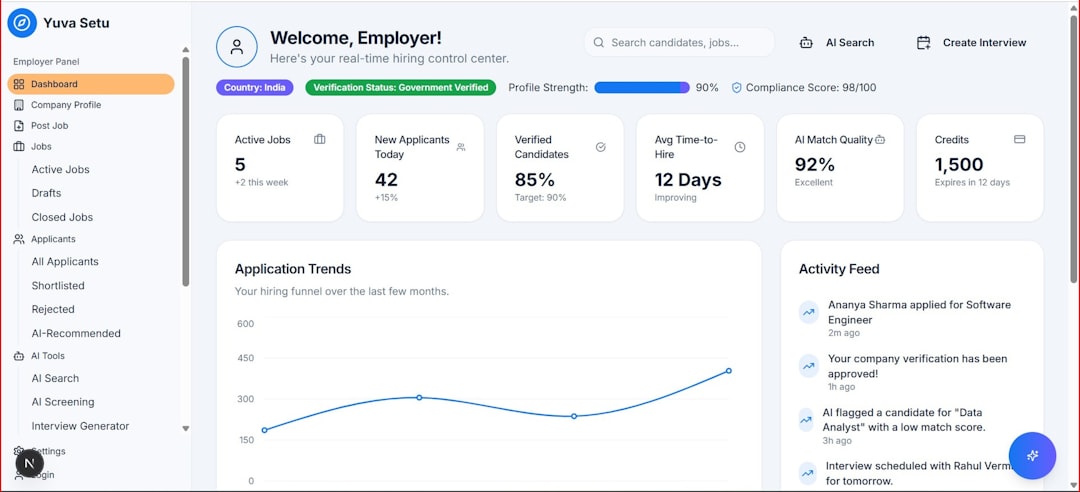
Why Employee Communication Apps Matter
Good communication is not just “nice to have.” It affects speed, trust, and team energy. When people know what is happening, they feel less stressed. They make fewer mistakes. They also feel like part of something bigger.
These apps are not only for sending messages. Many support video calls, polls, task tracking, file sharing, employee recognition, and company announcements. Some are great for desk workers. Others shine with frontline teams. Let’s look at seven strong options.
1. Slack
Slack is like a digital office where conversations live in channels. You can create channels for teams, projects, social chat, customer issues, or big company news.
It is great for quick updates. It also works well with tools like Google Drive, Zoom, Trello, and Asana. That means fewer tabs. Fewer “Where is that file?” messages. More actual work.
- Best for: Fast-moving teams and tech-friendly companies.
- Fun feature: Emoji reactions. A tiny rocket can replace five reply messages.
- Engagement boost: Create channels like #wins, #shoutouts, or #pets.
Slack works best when channels stay tidy. Set simple rules. Use threads. Avoid turning every thought into a company-wide alert.
2. Microsoft Teams
Microsoft Teams is a strong pick for companies already using Microsoft 365. It brings chat, video meetings, files, calendars, and apps into one place.
Teams is useful for structured work. You can create teams for departments. Then you can add channels for specific topics. Files are easy to share through SharePoint and OneDrive.
- Best for: Companies that already use Outlook, Word, Excel, and PowerPoint.
- Fun feature: Together Mode during video calls. It makes people look like they are sitting in the same room.
- Engagement boost: Use polls during meetings to hear from quieter team members.
Teams can feel busy at first. Keep your setup simple. Too many channels can become a maze with coffee stains.
3. Google Chat
Google Chat is simple, clean, and useful for teams that live in Google Workspace. It connects well with Gmail, Google Drive, Docs, Sheets, and Meet.
It is not as flashy as some tools. But that can be a good thing. People can ask questions, share files, and jump into meetings without learning a whole new system.
- Best for: Small to mid-sized teams using Google Workspace.
- Fun feature: Smart integration with Google Meet and Calendar.
- Engagement boost: Use spaces for project teams and team updates.
Google Chat is a solid choice if you want less noise. It keeps communication light and easy.

4. Zoom
Zoom is famous for video meetings. But it now offers more than calls. Teams can use Zoom Team Chat, whiteboards, meeting summaries, and webinars.
Video matters because faces build trust. A five-minute check-in can solve what 20 messages cannot. It is also great for town halls, onboarding, training, and team celebrations.
- Best for: Remote teams, training sessions, and company-wide meetings.
- Fun feature: Virtual backgrounds. Yes, your team can meet from space.
- Engagement boost: Use breakout rooms for small group talks.
Use Zoom wisely. Not everything needs a meeting. If the update can be three sentences, send it in chat.
5. Trello
Trello is a visual task board. It uses cards, lists, and boards to show work in progress. Think of it as sticky notes that do not fall off the wall.
Trello is great for teams that want to see what is happening at a glance. You can make lists like To Do, Doing, and Done. Each card can include comments, due dates, checklists, and files.
- Best for: Creative teams, marketing teams, and simple project tracking.
- Fun feature: Dragging cards to Done. It feels oddly satisfying.
- Engagement boost: Make team progress visible so wins feel shared.
Trello helps reduce “What is the status?” messages. The board answers that question for everyone.
6. Asana
Asana is built for task management and team coordination. It helps teams plan work, assign owners, set deadlines, and track progress.
Asana is stronger than a simple chat app when projects have many moving parts. You can view work as lists, boards, timelines, or calendars. This helps different people understand work in their own way.
- Best for: Project-heavy teams and cross-functional work.
- Fun feature: Celebration animations when tasks are completed.
- Engagement boost: Give each task a clear owner. Clarity reduces stress.
Asana is a good fit when your team says, “Who is doing this?” more than once a day.
7. Staffbase
Staffbase is designed for internal communication, especially in larger companies. It works well for reaching employees who do not sit at desks all day. Think retail staff, factory teams, healthcare workers, drivers, and field teams.
It can support news feeds, push notifications, employee newsletters, surveys, and mobile access. This matters because frontline workers often miss updates sent by email.
- Best for: Large companies and frontline employee communication.
- Fun feature: Branded employee app experience.
- Engagement boost: Send quick pulse surveys after major announcements.
Staffbase helps leaders speak to everyone, not just people with laptops open all day.
How to Choose the Right App
Do not pick the shiniest tool. Pick the one your team will actually use. A powerful app is useless if everyone avoids it like a mystery lunch in the office fridge.
Ask these simple questions:
- Who needs updates? Office staff, remote workers, frontline teams, or everyone?
- What is the main problem? Too many emails, missed tasks, poor meetings, or low engagement?
- How tech-friendly is the team? Simple may beat advanced.
- What tools do you already use? Choose apps that connect well.
- Do people need mobile access? This is key for frontline teams.
Simple Tips to Improve Engagement
The app is only part of the story. Culture matters too. Use the tool in a human way.
- Celebrate wins. Share good news often.
- Use clear channels. Keep topics organized.
- Limit noise. Not every message is urgent.
- Invite feedback. Use polls and quick surveys.
- Recognize people. A public thank-you goes a long way.
- Train managers. They set the communication tone.
Also, write like a human. Short messages work best. Use plain words. Add warmth. A little humor is fine. A dancing banana emoji may even help, if used responsibly.
Final Thoughts
Employee communication apps can make work clearer, faster, and more connected. Slack and Teams are great for daily chat. Google Chat keeps things simple. Zoom brings people face to face. Trello and Asana make work visible. Staffbase helps reach employees everywhere.
The best app is not always the biggest one. It is the one that solves your team’s real communication problems. Start small. Set good habits. Then watch collaboration get smoother, happier, and a lot less “Did you see my email?”
