 logo
logo


AI Security Audit is the latest and newest feature in WP Captcha PRO that analyzes your site’s security activity and turns login and CAPTCHA data into actionable insights and recommendations.
Instead of requiring you to interpret large amounts of security logs, the AI Security Audit looks for meaningful patterns in your site’s activity and explains what may be happening, why it matters, and what you can do about it.
It uses local rules, statistics, and pattern analysis but does not send your security logs or sensitive site data to any external AI services.
How To Enable the AI Security Audit?
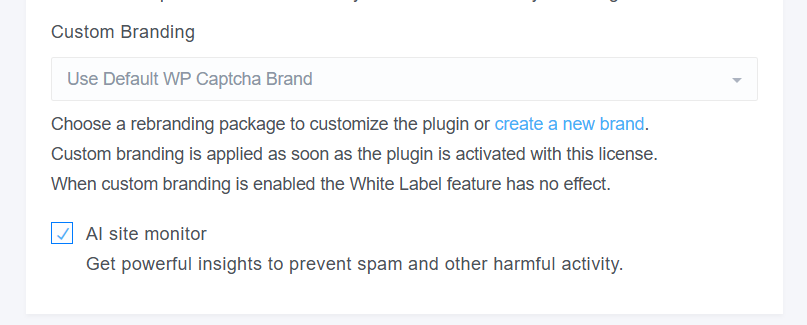
To start using the AI Security Audit, first enable the feature from the Licenses page in your WP Captcha PRO dashboard. Locate the AI Security Audit option and activate it for your website. Press the “Edit” button on the left-hand side, locate the “AI site monitor” checkbox, and enable it.
Once enabled, WP Captcha PRO will begin processing the available security data and generating Insights & Recommendations based on login activity, CAPTCHA attempts, traffic patterns, countries, IP addresses, and other supported security metrics. Depending on the amount of data available, it may take some time before meaningful insights are generated.
IMPORTANT: If the Dashboard displays security statistics but the website still shows “Not enough data”, please allow up to 24 hours for the plugin to collect and process the necessary data. Once sufficient data has been collected, the statistics, insights, and recommendations should be displayed correctly on the website.
What Does the AI Security Audit Analyze?
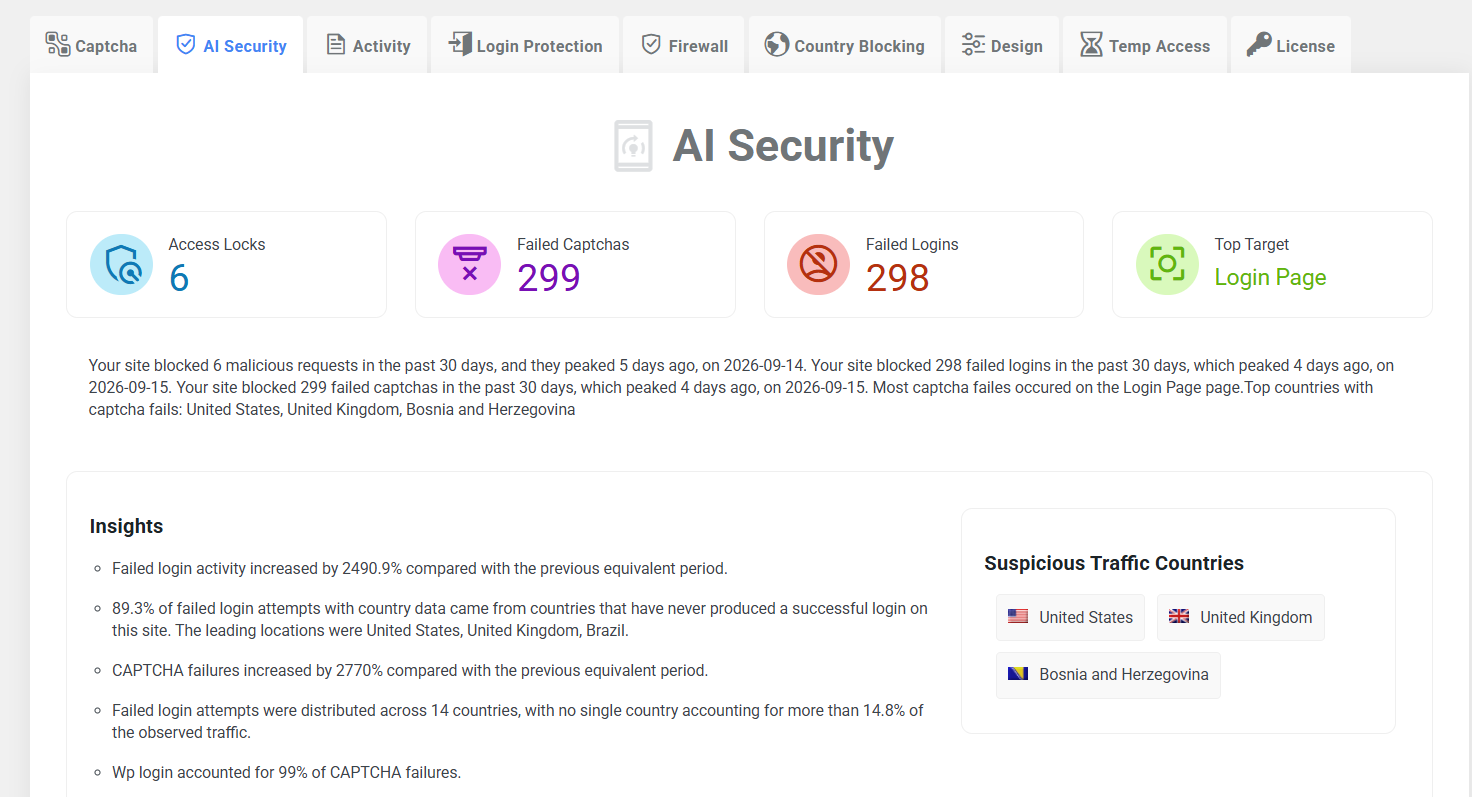
The audit analyzes security data WP Captcha PRO collects over time, including:
- Successful and failed login attempts
- Successful and failed CAPTCHA attempts
- Countries and geographic locations
- IP addresses
- Browsers and devices
- Bot and traffic types
- CAPTCHA-protected forms
- Changes in activity over time
The system then identifies patterns that may require your attention and prioritizes the most useful findings.
Insights & Recommendations
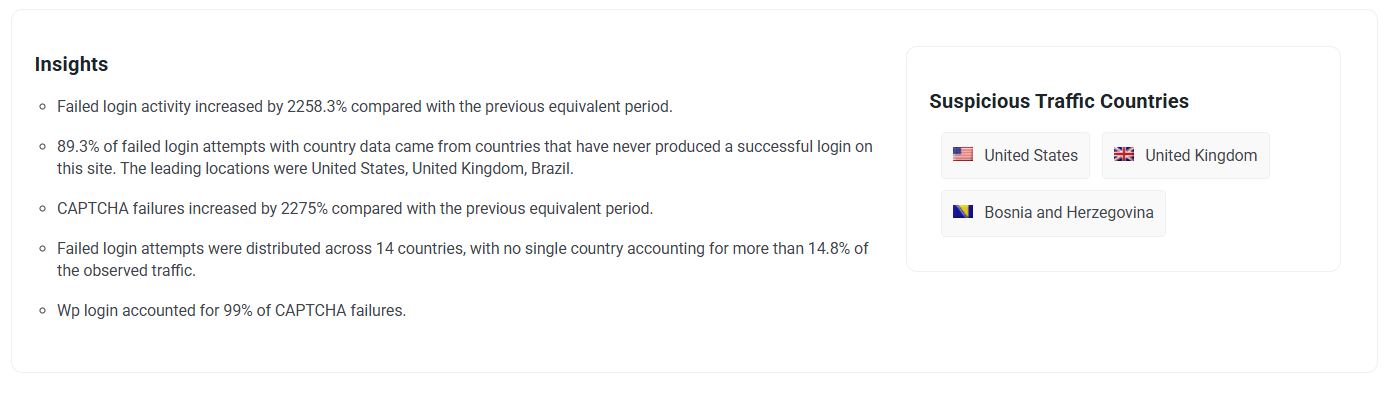
The Insights & Recommendations section summarizes important security patterns detected on your website.
For example, the audit can identify that:
- Failed login activity has increased significantly compared with the previous period.
- Most failed login attempts originate from countries that have never produced a successful login.
- Login attempts are concentrated around a small number of IP addresses.
- CAPTCHA failures are heavily concentrated on the Login Page.
- Visitors frequently fail CAPTCHA several times before successfully completing a form.
- Your website is experiencing sustained failed login traffic that may justify additional account protection.
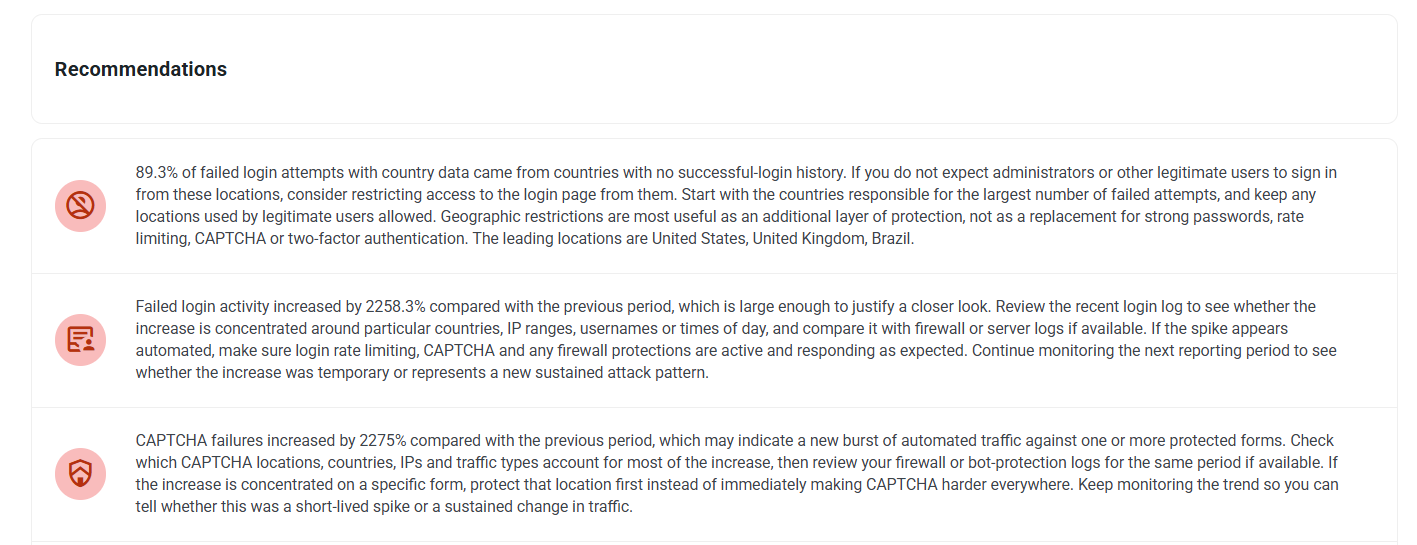
Each insight includes a practical recommendation where appropriate! For example, WP Captcha PRO may recommend reviewing:
- Rate limiting
- Firewall and bot protection
- Geographic restrictions
- Two-factor authentication
- CAPTCHA settings
- Checkout CAPTCHA protection
- Login URL exposure
- Repeatedly offending IP addresses
The system prioritizes recommendations so you see the most relevant actions instead of being presented with every possible observation.
Login Security Analysis
The AI Security Audit analyzes both successful and failed login activity to help identify unusual login patterns.
Failed Login Trends
WP Captcha PRO compares the current reporting period with the previous equivalent period. If failed login activity suddenly increases, the audit can highlight the change and recommend reviewing your recent login activity.
For example: Failed login activity increased significantly compared with the previous period.
This can help you distinguish normal background activity from a sudden increase in unwanted login attempts.
Country Comparison
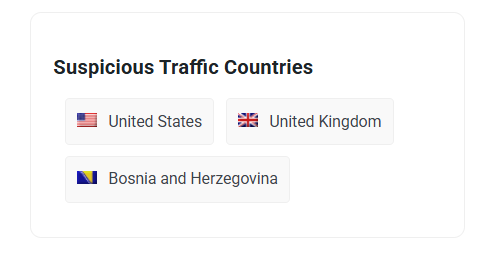
The audit compares countries generating failed login attempts with countries that have previously generated successful logins.
For example, if the majority of failed login attempts originate from countries that have never produced a successful login, WP Captcha PRO can suggest considering geographic restrictions.
The opposite situation is also taken into account. If failed login traffic comes heavily from countries that also have successful login history, the system can warn that aggressive country blocking could potentially affect legitimate users.
This allows geographic restrictions to be considered in context rather than applied automatically.
IP Attack Patterns
WP Captcha PRO can analyze whether failed login activity is:
- Concentrated around one or a few IP addresses
- Distributed across many different IP addresses
The resulting recommendation can vary depending on the pattern. For concentrated activity, recommendations may focus on rate limiting or blocking repeat offenders, while for distributed activity, the audit may suggest reviewing firewall and bot-protection measures.
CAPTCHA Security Analysis

The AI Security Audit also examines CAPTCHA activity across your website.
CAPTCHA Failure Trends
The system compares CAPTCHA failures with the previous equivalent reporting period and can identify significant increases or decreases.
This can help you determine whether a sudden increase represents a temporary spike or a more sustained change in traffic.
CAPTCHA Analysis by Form
CAPTCHA failures are analyzed by location and form, including areas such as:
- Login
- Registration
- Comments
- Checkout
- Other protected forms
If most CAPTCHA failures are concentrated on a particular form, the audit can recommend focusing your investigation there instead of changing CAPTCHA settings across the entire website.
For example, if checkout accounts for most CAPTCHA failures, the recommendation may focus specifically on reviewing the checkout CAPTCHA experience.
CAPTCHA Recovery & User Friction
Not every CAPTCHA failure represents malicious activity. The AI Security Audit can identify situations where the same visitor repeatedly fails CAPTCHA and then succeeds shortly afterward, which helps identify potential CAPTCHA friction.
For example, if visitors frequently need four or five attempts before successfully completing checkout, the audit can highlight this pattern for review.
This provides additional context when interpreting CAPTCHA failures and helps distinguish possible user-experience issues from purely automated or malicious traffic.
CAPTCHA Locks
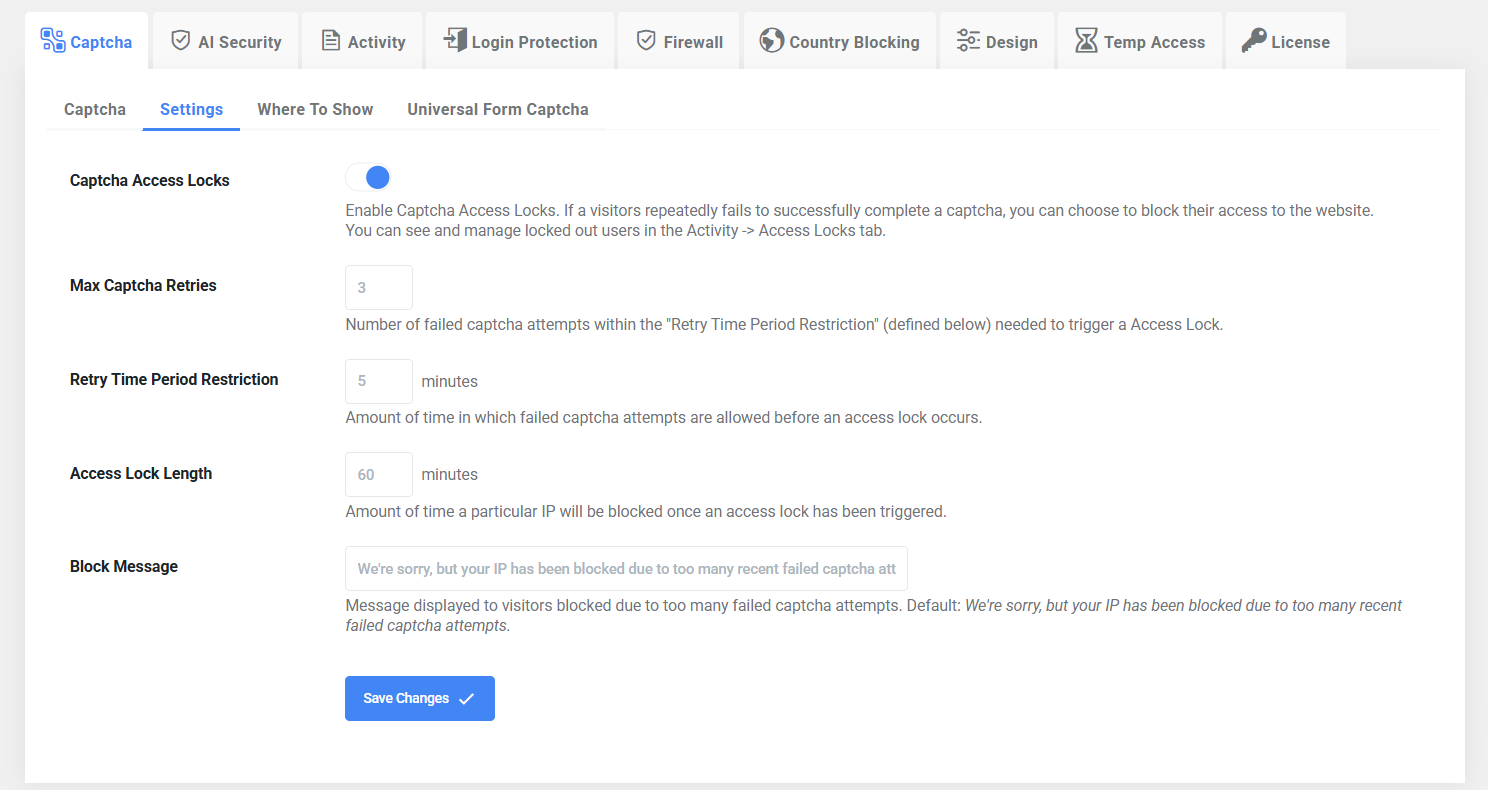
WP Captcha PRO now includes CAPTCHA Locks, which allow you to temporarily block visitors who repeatedly fail CAPTCHA, and manage locked-out users in the Activity > Access Locks tab.
You can configure a threshold for failed CAPTCHA attempts. When a visitor exceeds the configured threshold, WP Captcha PRO can temporarily block further access, which can help prevent bots or abusive visitors from continuously submitting protected forms and repeatedly failing CAPTCHA.
CAPTCHA Locks provide an additional layer of protection alongside CAPTCHA itself, rather than relying on CAPTCHA failures to continue indefinitely.
Additionally, you can configure the Max CAPTCHA Retries to define how many failed CAPTCHA attempts are allowed before an Access Lock is triggered. The Retry Time Period Restriction determines the time window in which those failed attempts are counted, while Access Lock Length specifies how long the user’s IP address will remain blocked after the lock is activated. You can also customize the Block Message displayed to users while they are blocked.
Data-Based Recommendations
The AI Security Audit can recommend different security measures depending on the patterns detected on your website.
Possible recommendations include:
- Enable or tighten rate limiting when repeated login attempts are detected.
- Review firewall or bot protection when suspicious activity is distributed across many IP addresses.
- Consider geographic restrictions when failed login traffic predominantly originates from locations with no successful-login history.
- Enable two-factor authentication for privileged accounts when sustained login attacks are detected.
- Review CAPTCHA difficulty when unusual CAPTCHA failure patterns appear.
- Review specific protected forms when CAPTCHA failures are concentrated on areas such as checkout or registration.
- Change the default WordPress login URL to reduce automated probing of common WordPress login paths.
- Investigate repeated IP offenders when attacks are concentrated around a small number of addresses.
Recommendations are based on the available security data and are intended to help site owners decide which areas deserve further attention.
Smart Data Analysis
The AI Security Audit is designed to avoid making conclusions based on very small datasets.
WP Captcha PRO considers factors such as:
- How long the plugin has been collecting data
- The number of recorded security events
- The amount of available login and CAPTCHA data
- The strength of detected patterns
If there isn’t enough information to produce a meaningful conclusion, the system can indicate that more data is needed instead of presenting potentially misleading recommendations.
Insights are also prioritized so that the dashboard focuses on the observations that are most useful to the site owner.
Multi-Site Security Insights
The WP Captcha PRO dashboard can also aggregate security statistics from multiple websites running the new version of the plugin.
This allows you to view combined statistics across supported sites rather than analyzing every website independently.
Older installations that don’t provide the new analytics data are simply excluded from the new aggregate reporting.
Aggregate statistics such as country, browser, device, and bot data are calculated using actual event counts, rather than simply averaging percentages from individual websites. This provides a more representative view when sites have significantly different amounts of traffic.
Performance Optimizations
The new security analysis performs additional grouping and analysis of login and CAPTCHA events by factors such as:
- Date
- Country
- IP address
- CAPTCHA activity
To support these queries efficiently as security logs grow, WP Captcha PRO includes additional database indexes for the relevant event tables.
This helps keep the new analytics functionality responsive even when larger amounts of security data have accumulated.
Security Audit in Practice
The AI Security Audit is designed around a simple principle: Don’t just show security data – explain what the data may mean.
Instead of requiring site owners to manually interpret hundreds of failed login attempts or CAPTCHA failures, WP Captcha PRO identifies relevant patterns and presents them as prioritized insights.
For example, the audit can turn raw data such as:
- 298 failed logins
- 299 failed CAPTCHA attempts
- Activity increased significantly compared with the previous period
into practical observations such as:
“Failed login activity has increased significantly and should be investigated”, or “Most failed login attempts originate from countries with no successful-login history. Consider whether geographic restrictions would be appropriate.”
This makes the security dashboard more useful for both technical and non-technical WordPress administrators.
Quick Overview
| Feature | What It Does |
| AI Security Audit | Analyzes security data and generates actionable insights |
| Login Analysis | Detects unusual failed-login patterns and trends |
| Country Analysis | Compares failed-login countries with successful-login history |
| IP Analysis | Identifies concentrated or distributed login attacks |
| CAPTCHA Analysis | Analyzes CAPTCHA failures across your website |
| Form Analysis | Identifies which protected forms generate the most failures |
| Recovery Analysis | Detects repeated CAPTCHA failures followed by success |
| Trend Detection | Compares current activity with previous reporting periods |
| AI Recommendations | Suggests relevant security measures based on detected patterns |
| CAPTCHA Locks | Temporarily blocks visitors after repeated CAPTCHA failures |
| Multi-Site Reporting | Aggregates security statistics across supported websites |
| Data Safeguards | Avoids concluding when there is insufficient data |
| Privacy-Focused AI | Performs analysis locally without sending logs to external AI APIs |
| Database Optimizations | Improves performance of analytics queries on larger datasets |