 logo
logo



Turning a simple idea into an engaging video used to require expensive cameras, complex editing software, and a steep learning curve. Today, however, a wide range of intuitive tools makes it possible for creators, marketers, educators, and entrepreneurs to transform rough concepts into polished, high-impact videos in a matter of hours. Whether you’re building short-form social content, explainer videos, or marketing campaigns, the right tools can help you move from inspiration to publication faster—and with better results.
TLDR: Modern video creation tools make it easier than ever to turn simple ideas into compelling videos. From AI-powered script generators to drag-and-drop editing platforms and animation software, there’s a solution for every skill level and budget. The best results often come from combining tools strategically. By choosing the right mix, creators can focus more on storytelling and less on technical hurdles.
Let’s explore the go-to tools that can elevate your ideas and help you craft engaging videos that capture attention and drive results.
1. AI Scriptwriting Tools: From Spark to Structured Story
Every great video starts with a strong concept—but shaping that concept into a coherent script can be challenging. AI-powered writing tools help transform scattered thoughts into structured outlines, dialogues, or full scripts within minutes.
These tools are ideal for:
- Brainstorming video angles from a single topic
- Writing YouTube scripts with hooks and calls to action
- Generating explainer narratives
- Refining tone for different audiences
Instead of staring at a blank page, creators can input a short description—such as “a two-minute product demo for a fitness app”—and receive a structured draft. With light editing and personalization, that draft becomes production-ready.
Pro tip: Use AI-generated scripts as a foundation, but always add your unique voice, examples, and brand messaging to maintain authenticity.
2. Storyboarding and Planning Platforms: Visualizing the Flow
Before pressing record, it’s essential to see how your video will unfold visually. Storyboarding tools help creators arrange scenes, transitions, and key shots so the final product feels cohesive and intentional.

Digital storyboarding platforms allow you to:
- Drag and drop scene elements
- Attach script snippets to visuals
- Collaborate with team members in real time
- Map out camera angles and transitions
Even simple slides or visual planning boards can dramatically improve video pacing. When you can see your structure, you avoid common pitfalls like repetitive shots or disjointed messaging.
3. All-in-One Video Creation Platforms: Drag, Drop, Done
For creators who want speed without sacrificing quality, all-in-one video platforms are game changers. These tools combine templates, stock footage, music libraries, transitions, and text animations into one intuitive interface.
Key advantages include:
- Pre-designed templates for social media, ads, and presentations
- Royalty-free assets built directly into the editor
- Automated resizing for platforms like TikTok, Instagram, and YouTube
- Minimal technical setup
Many of these platforms are cloud-based, making them ideal for remote teams and creators who work across multiple devices.
4. Professional Editing Software: Precision and Control
When you need detailed control over color grading, sound mixing, or advanced transitions, professional editing software steps in. These platforms offer frame-by-frame precision, layered audio tracks, advanced effects, and cinematic tools.
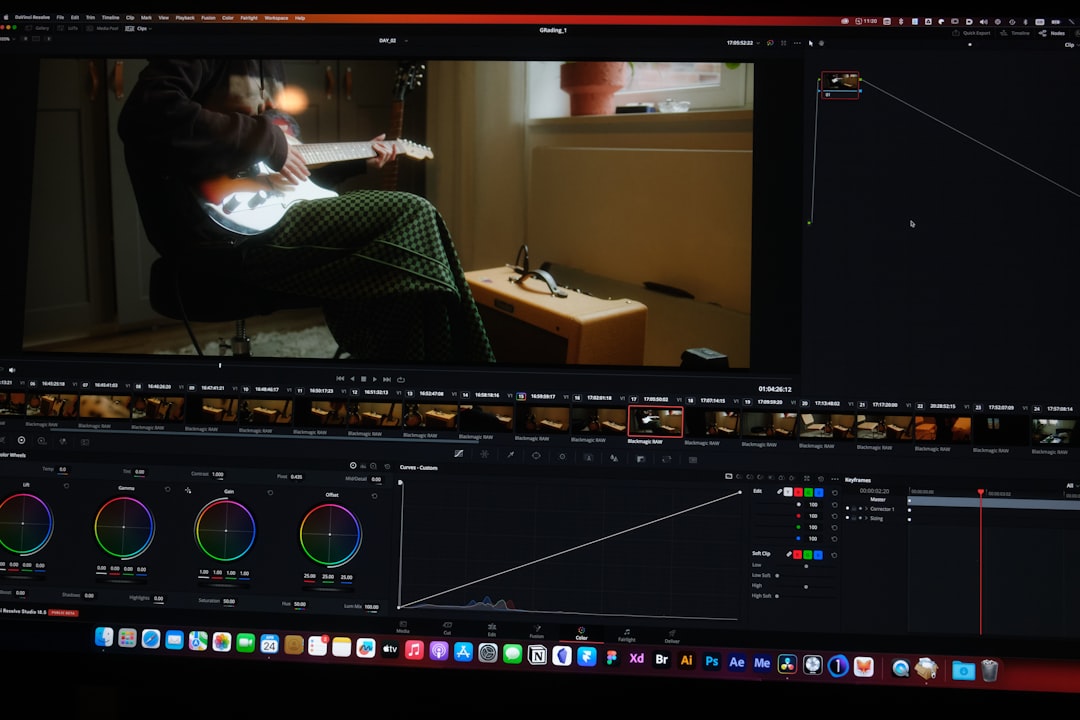
Professional tools shine in scenarios such as:
- Brand commercials
- Documentaries
- High-production YouTube content
- Corporate training videos
While the learning curve is steeper, the creative flexibility is unparalleled. Many professionals use these tools in combination with faster, template-based platforms for different types of content.
5. Animation and Motion Graphics Tools: Making the Invisible Visible
Some ideas are difficult—or impossible—to film. That’s where animation tools come in. Whether you’re explaining how blockchain works or illustrating internal business processes, animation software transforms complex ideas into clear visuals.
Types of animation tools include:
- 2D explainer animation platforms
- Whiteboard animation tools
- Motion graphics software
- Character animation builders
Animation often increases engagement because it introduces movement, color, and metaphor. Viewers grasp abstract concepts faster when visuals guide the story.
6. AI Voiceovers and Audio Tools: Professional Sound Without a Studio
Audio quality can make or break a video. Fortunately, AI voiceover tools and sound enhancement platforms make polished audio accessible to everyone.

These tools offer:
- Natural-sounding AI-generated voices
- Multiple language options
- Background noise reduction
- Automated audio leveling
For creators without access to a recording studio, AI voice tools can produce surprisingly realistic narration. Pair that with background music and subtle sound effects, and your video instantly feels more cinematic.
7. Screen Recording Tools: Perfect for Tutorials and Demos
When your idea involves teaching, demonstrating software, or walking viewers through a process, screen recording tools are essential. These tools allow you to capture your display while adding voice narration and webcam overlays.
Ideal use cases include:
- Software tutorials
- Product walkthroughs
- Online course lessons
- Internal training content
Some screen recording tools include built-in editing features, annotations, and cursor highlights to make your instructions clearer.
Comparison Chart: Choosing the Right Tool Type
| Tool Type | Best For | Skill Level | Speed | Customization |
|---|---|---|---|---|
| AI Scriptwriting | Idea development and outlines | Beginner | Very Fast | Moderate |
| All-in-One Video Platforms | Social media and marketing videos | Beginner to Intermediate | Fast | Moderate |
| Professional Editing Software | Cinematic and commercial projects | Advanced | Medium | High |
| Animation Tools | Explainers and abstract topics | Intermediate | Medium | High |
| AI Voice and Audio Tools | Narration and sound enhancement | Beginner | Fast | Moderate |
| Screen Recording Tools | Tutorials and demos | Beginner | Very Fast | Low to Moderate |
How to Combine Tools for Maximum Impact
The real magic happens when these tools are used together. For example:
- Start with an AI scriptwriting tool to outline your concept.
- Use a storyboarding platform to map the visual flow.
- Record narration with an AI voice tool.
- Edit everything inside an all-in-one editor or professional software.
- Add animated elements using motion graphics tools.
This modular approach helps creators maintain efficiency without compromising quality.
What to Look for When Choosing Your Tools
Not all tools suit every creator. When evaluating options, consider:
- Your primary goal: Brand awareness, education, sales, or entertainment?
- Your experience level: Do you prefer plug-and-play or advanced control?
- Your production volume: Occasional videos or daily content?
- Your distribution channels: Vertical, horizontal, long-form, short-form?
- Your budget: Subscription, one-time purchase, or free plan?
Often, starting simple and upgrading as your skills grow is the most sustainable path.
The Future: Automation Meets Creativity
AI and automation are rapidly reducing the technical barriers to video creation. Automated captioning, smart cut suggestions, background replacements, and even AI-generated B-roll are becoming mainstream features.
However, while technology accelerates production, storytelling remains human. Tools can generate structure and polish, but the emotional hook—the humor, empathy, tension, and surprise—comes from the creator’s insight.
Ultimately, the most engaging videos blend:
- Strong ideas
- Clear structure
- Compelling visuals
- Polished sound
- Authentic voice
The good news? Today’s go-to tools make each of those elements more accessible than ever.
Whether you’re a solo entrepreneur launching your first brand video or a seasoned marketer scaling content production, the right toolkit can turn even a simple idea scribbled on a napkin into a video that informs, inspires, and captivates your audience.
